字节笔记本
2026年10月6日 · 约 9 分钟读完
Cordis 教程 07:注册工具,观察结果事件
本文整理自 DeepSeek 开源 agent 框架 deepseek-harness 的官方 Cordis 入门教程,是该系列的实践收尾。这一系列从第一个插件、生命周期与 effect、服务注入一路讲到事件与组合,本章把它们拧成一次真实运行:向 harness 的 tools 服务注册一个模型可调用的工具,经真实工具流水线执行一遍,再用一个独立插件观察结果事件。整个过程不需要任何 API 密钥,也不会调用模型,模型的位置由代码自己顶上。
工具插件:把 greet 注册进 tools 服务
创建 greet-tool.ts,放在教程目录的 tmp/cordis-tutorial 下:
import type { Context } from '@deepseek-ai/cordis'
import { defineTool } from '@deepseek-ai/dsh-tools'
import { CallId } from '@deepseek-ai/dsh-llm'

export const name = 'greet-tool'
export const inject = ['tools']

export function apply(ctx: Context) {
  ctx.tools.register(defineTool({
    name: 'greet',
    description: 'Greet the named person.',
    parameters: {
      name: { type: 'string', required: true, description: 'Who to greet' },
    },
    output: {
      schema: { type: 'string' },
      render: (_args, value) => [{ type: 'text', text: value }],
    },
    async execute(args) {
      return `Hello, ${args.name}!`
    },
  }))

  // Drive one call through the real execution pipeline, standing in for
  // the model. CallId brands the correlation id a provider would issue.
  void (async () => {
    const result = await ctx.tools.execute({
      callId: CallId('demo-1'),
      name: 'greet',
      arguments: { name: 'Cordis' },
      signal: new AbortController().signal,
    })
    console.log('tool replied:', JSON.stringify(result.content))
  })()
}
代码不长,信息量却不小:
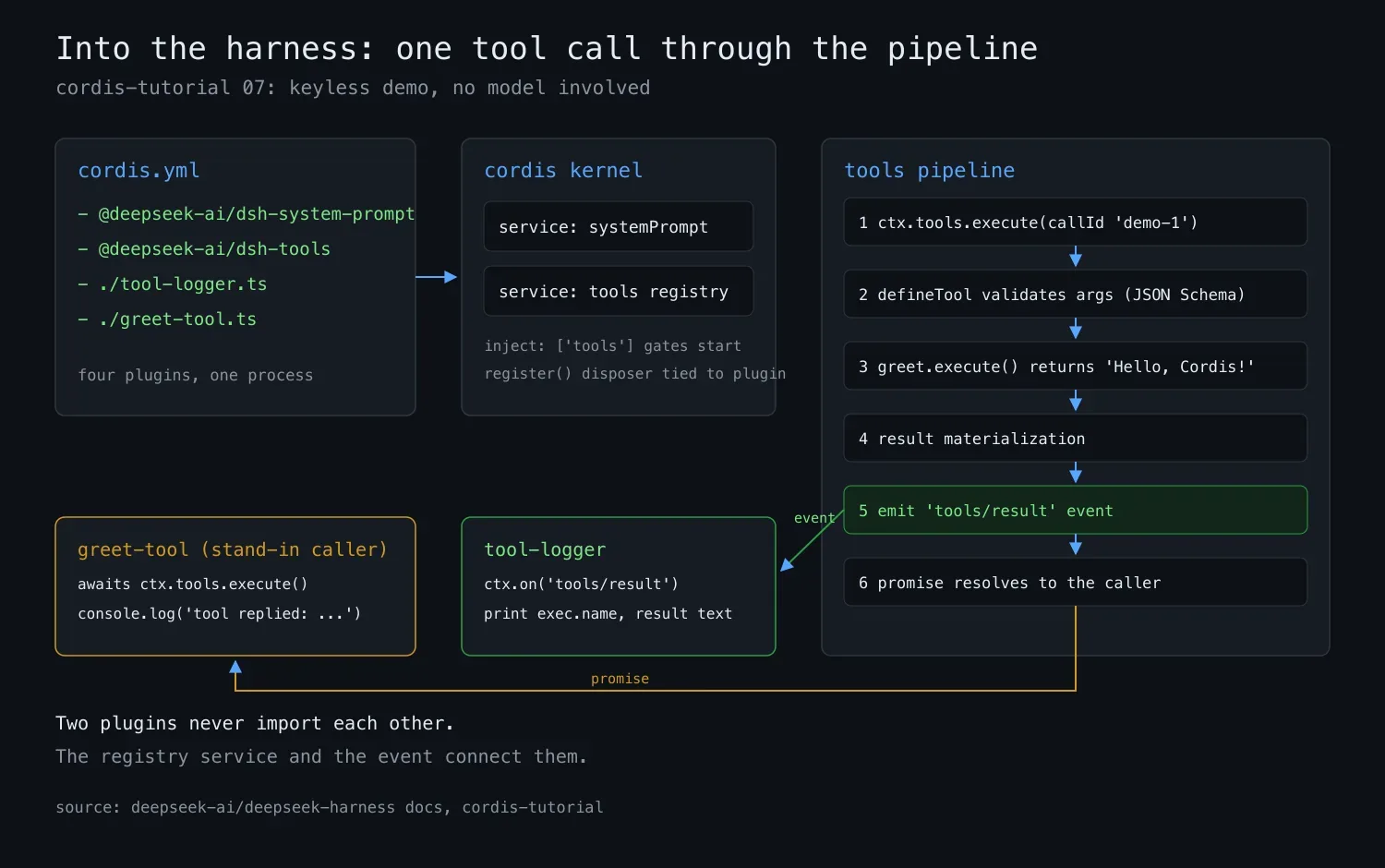
inject: ['tools']是依赖声明,插件会一直等待,直到工具注册表服务就绪才启动,避免拿到一个空注册表;ctx.tools.register(...)把工具注册进注册表,注册动作产生的注销函数会挂到插件自己的生命周期上,插件卸载时工具随之注销,不留悬空能力;defineTool一肩挑三件事:把parameters规约转成给模型看的 JSON Schema,推导execute入参的 TypeScript 类型,并在execute执行前校验模型传来的参数;output.schema声明工具的规范返回值,output.render则另行生成可持久化的结果内容,规范值与呈现内容从此分工。
插件后半段用 ctx.tools.execute(...) 手动发起一次调用,站在模型的位置走完整流水线:CallId 给调用打上关联 ID,模拟真实 provider 下发的编号;signal 传入中止信号,供上层随时叫停。也就是说,除了调用方从模型换成了这段代码,其余环节全是真的。
观察插件:监听 tools/result 事件
再创建 tool-logger.ts。它与 greet-tool 没有任何依赖关系,是一个纯观察者:
import type { Context } from '@deepseek-ai/cordis'
import type {} from '@deepseek-ai/dsh-tools'

export const name = 'tool-logger'
export const inject = ['tools']

export function apply(ctx: Context) {
  ctx.on('tools/result', (exec, result) => {
    const text = result.content
      .map(block => (block.type === 'text' ? block.text : ''))
      .join('')
    console.log(`[tool-logger] ${exec.name} -> ${text}`)
  })
}
import type {} from '@deepseek-ai/dsh-tools' 这行看似空操作,实际是把该包的声明合并引入当前工程,让 'tools/result' 事件名及其载荷获得完整类型。事件回调从结果内容块中拼出文本,把每次工具调用的名字与输出打印出来。应用里的每一次工具调用都逃不过它的眼睛。
组合并运行
把四个插件写进组合文件 cordis.yml:
- name: '@deepseek-ai/dsh-system-prompt'
- name: '@deepseek-ai/dsh-tools'
- name: './tool-logger.ts'
- name: './greet-tool.ts'
注意 @deepseek-ai/dsh-system-prompt 必须在清单里。工具要向系统提示词贡献自己的 schema,所以 dsh-tools 会声明注入 systemPrompt 服务,组合文件就得同时列出该服务的提供方;少了这一行,tools 插件会因为依赖无法满足而停留在 PENDING 状态,什么也不执行。
启动内核:
node --import tsx ../../vendor/cordis/bin.js输出两行:
[tool-logger] greet -> Hello, Cordis!
tool replied: [{"type":"text","text":"Hello, Cordis!"}]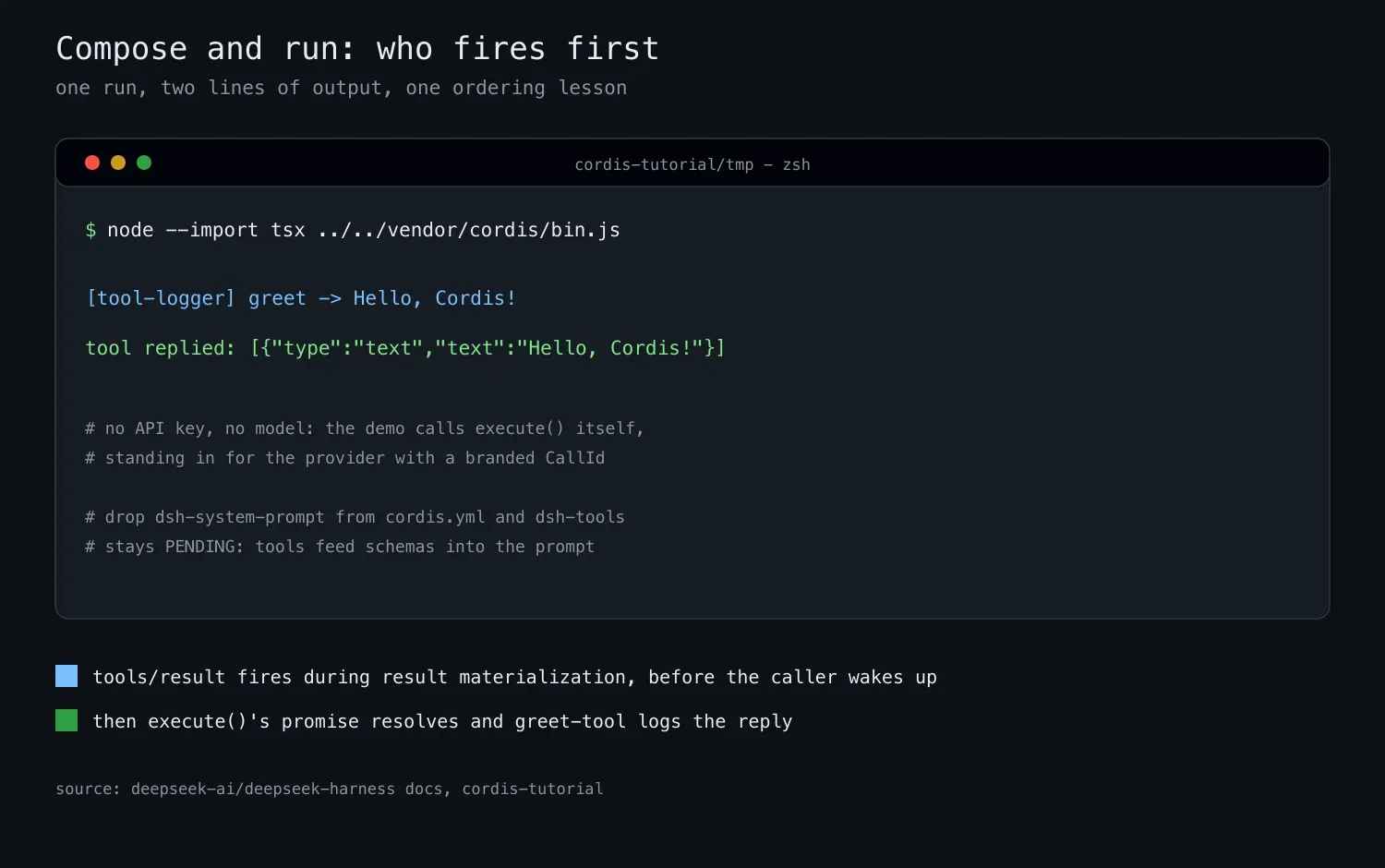
两行的先后顺序有讲究:logger 先触发,因为 tools/result 是在结果物化过程中发出的,早于 execute 的 promise 向调用方兑现。更值得注意的是,greet-tool 与 tool-logger 互相不知道对方存在,没有任何 import 关系,把它们连起来的是两件东西:注册表服务和事件。能力之间零耦合,靠服务与事件这两个枢纽协作,这正是插件式框架的核心打法。
离完整 agent 还差几块
这份组合再补几个插件就是一个真正的 agent:LLM 适配器负责接模型,agent loop 负责循环推进,持久化负责保存会话,再加一个运行入口。框架仓库 examples 里的 headless-agent 示例组合文件,现在每一行都能读懂了:把自己的 greet-tool 加进那份文件的副本,工具就会出现在模型可调用的清单里,剩下的循环交给框架。
想继续深入,可以顺着几条线走:defineTool 的完整用法,包括呈现层与更复杂的参数 schema;框架的三层能力设计,看可替换能力如何组织;子系统页面上的 cordis-surface 区块,列出所有可注入的服务与可监听的事件;以及整体架构文档,看这些插件在系统地图里的位置。工具写好、流水线跑通之后,距离让模型真正调用它,只差一层组合文件的配置。