字节笔记本
2026年10月6日 · 约 19 分钟读完
用 next-i18next 实现 Next.js 国际化
在面向多地区用户的项目里,多语言支持几乎成了标配。Next.js 生态中可选的国际化方案不少,但要把框架选型、配置、翻译文件组织、语言切换、开发体验和测试完整串成一条链路,官方文档往往只覆盖其中一环。本文整理一套在 Pages Router 项目中完整落地的 next-i18next 方案,从选型一直讲到测试与常见报错的处置。
一、框架选型:为什么是 next-i18next
Next.js 官方文档提到过三个主流国际化框架:next-i18next、next-translate 和 next-intl。本方案对比后选择 next-i18next,理由有四点:一是使用灵活,完整支持 SSR;二是功能完善,多语言与多命名空间开箱即用;三是社区活跃,npm 下载量在三者中领先;四是底层是久经考验的 i18next,适合大型项目长期演进。
有一条重要边界要提前说明:如果项目使用 Next.js 13 以上版本的 App Router,官方建议直接使用 i18next 与 react-i18next,不必再引入 next-i18next 这层封装;本文方案针对的则是仍在大量存量的 Pages Router 项目。
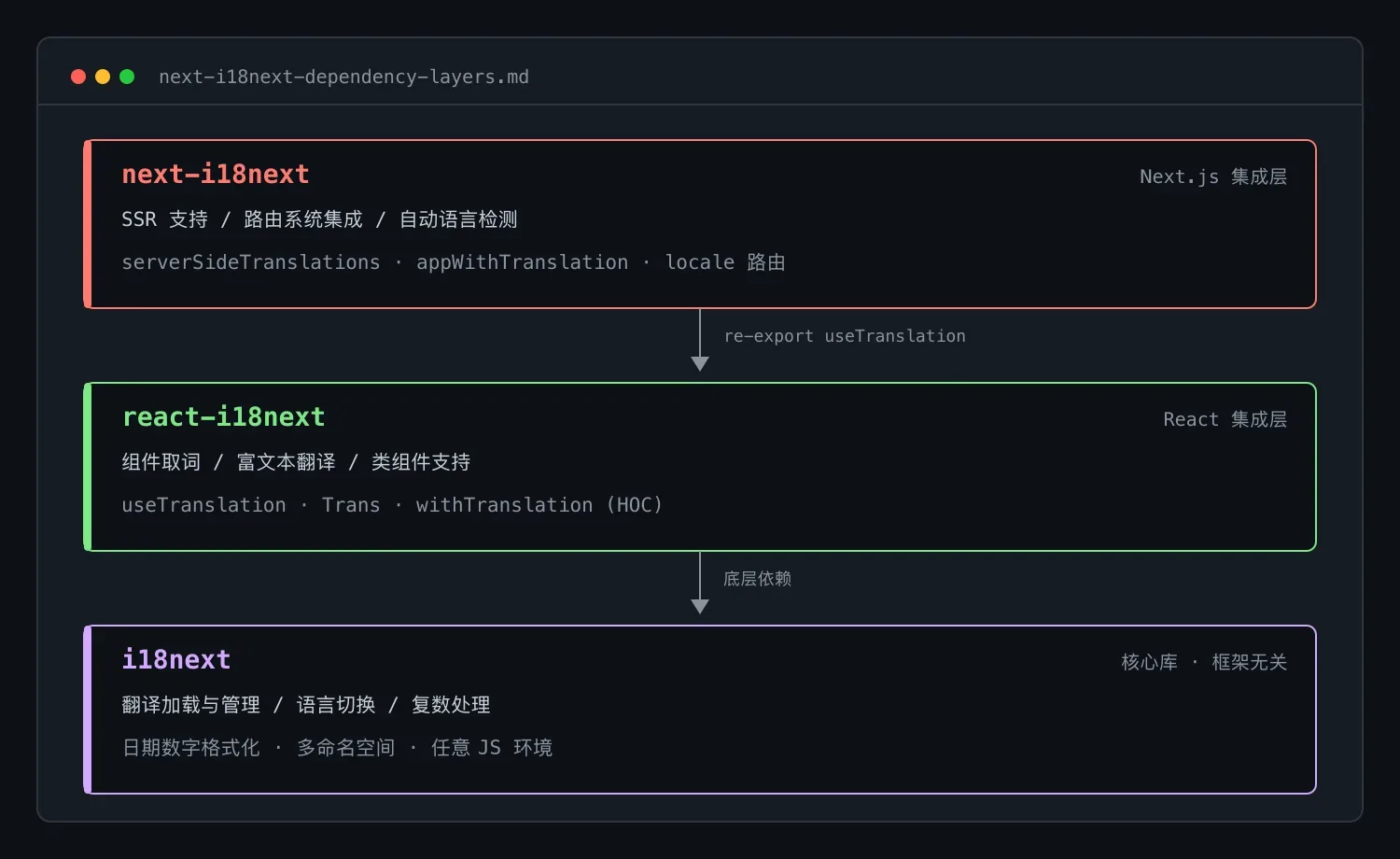
安装时三个包一起装:yarn add next-i18next react-i18next i18next。三者是清晰的分层关系,各自职责如下。
- i18next:与框架无关的国际化核心库,负责翻译文本的加载与管理、语言切换、复数处理、日期与数字格式化、命名空间管理,可以在任何 JavaScript 环境中运行。
- react-i18next:i18next 的 React 集成层,提供在组件中取词的 useTranslation hook、处理含 HTML 或子组件的富文本翻译的 Trans 组件,以及面向类组件的 withTranslation 高阶组件。
- next-i18next:在前两者之上补齐 Next.js 特有能力,包括服务端渲染支持、与路由系统的集成、自动语言检测和针对性性能优化。日常开发主要与它的 API 打交道,组件里用到的 useTranslation 实际就是从 react-i18next 重导出的。
二、配置步骤
1. 基础配置文件
在项目根目录创建 next-i18next.config.js:
const path = require('path');

module.exports = {
  i18n: {
    defaultLocale: 'en',
    locales: ['en', 'zh'],
    localePath: path.resolve('./public/locales'),
  },
};
2. 修改 next.config.js
const { i18n } = require('./next-i18next.config');

const nextConfig = {
  i18n,
  webpack: (config, { isServer }) => {
    if (!isServer) {
      config.resolve = {
        ...config.resolve,
        fallback: {
          ...config.resolve.fallback,
          fs: false,
        },
      };
    }
    config.module = {
      ...config.module,
      exprContextCritical: false,
    };
    return config;
  },
};

module.exports = nextConfig;
webpack 里的两处改动各有用途:客户端构建把 fs 模块的 fallback 置为 false,用来规避 i18next 在浏览器端解析 node 模块时出现的 Can't resolve 'fs' 报错;exprContextCritical 设为 false 则用于关闭 i18next 动态加载翻译文件时 webpack 的临界依赖警告,让构建日志干净下来。
三、翻译文件组织
在 public/locales 下按语言再按命名空间组织 JSON 文件:
public/
  └── locales/
      ├── en/
      │   ├── common.json
      │   └── order.json
      └── zh/
          ├── common.json
          └── order.json
以 order 命名空间为例,文件内容按业务路径逐层嵌套:
{
  "components": {
    "SubscribeFormModal": {
      "onOK": {
        "title": "Confirm",
        "message": "Are you sure?"
      }
    }
  }
}
按命名空间拆分的价值在于按需加载:每个页面只拉取自己声明需要的命名空间,不会把整站文案打进首屏,多语言带来的体积开销可以控制在可见范围内。
四、实现语言切换器
语言切换器用 Chakra UI 的 Menu 组件实现,核心逻辑是遍历支持的语言列表,点击时写 cookie 并切换路由:
import {
  Text,
  Menu,
  MenuButton,
  MenuItem,
  MenuList,
} from '@chakra-ui/react';
import { useRouter } from 'next/router';

const LANG_MAP = {
  en: { label: 'English' },
  zh: { label: '中文' },
} as const;

const LangSelect: React.FC = () => {
  const router = useRouter();
  const { pathname, asPath, query, locale } = router;

  return (
    <Menu autoSelect={false}>
      <MenuButton p="12px">
        <LanguageIcon />
      </MenuButton>
      <MenuList w="max-content" minW="120px">
        {Object.entries(LANG_MAP).map(([key, lang]) => (
          <MenuItem
            key={key}
            display="flex"
            alignItems="center"
            fontSize="sm"
            {...(key === locale ? { bg: 'A7Gray.200' } : {})}
            onClick={() => {
              document.cookie = `NEXT_LOCALE=${key}; max-age=31536000; path=/`;
              router.push({ pathname, query }, asPath, { locale: key });
            }}
          >
            <Text>{lang.label}</Text>
          </MenuItem>
        ))}
      </MenuList>
    </Menu>
  );
};

export default LangSelect;
点击切换时做了两件事:把 NEXT_LOCALE 写入 cookie,有效期一年且作用于全站路径;再用 router.push 保持当前路径与查询参数不变、只切换 locale。cookie 承担了语言偏好的持久化,用户下次访问不会被重置回默认语言。
五、开发体验:编辑器插件与类型提示
国际化项目维护的第一个痛点是 key 管理与文案核对。编辑器里装上 i18n-ally 插件,在 .vscode/settings.json 中加入:
{
  "i18n-ally.localesPaths": "public/locales",
  "i18n-ally.keystyle": "nested"
}
这样翻译文案可以在代码里内联预览、跳转与编辑。第二个痛点是 key 拼错只能在运行时发现,解决办法是给 i18next 补类型声明,创建 types/i18next.d.ts:
import 'i18next';
import order from '../../public/locales/en/order.json';
import common from '../../public/locales/en/common.json';

interface I18nNamespaces {
  order: typeof order;
  common: typeof common;
}

declare module 'i18next' {
  interface CustomTypeOptions {
    defaultNS: 'common';
    resources: I18nNamespaces;
  }
}
声明之后,t() 的 key 在编译期就有约束,拼错直接标红,命名空间与嵌套路径都能自动补全。
六、在页面中接入翻译
先用高阶组件包裹根组件,修改 pages/_app.tsx:
import { appWithTranslation } from 'next-i18next';

const MyApp = ({ Component, pageProps }) => (
  <Component {...pageProps} />
);

export default appWithTranslation(MyApp);
再封装一个获取本地化 props 的工具函数,避免每个页面重复书写 serverSideTranslations:
import { GetStaticProps } from 'next';
import { serverSideTranslations } from 'next-i18next/serverSideTranslations';
import { I18nNamespaces } from '@/types/i18next';

const getLocaleProps =
  (namespaces: (keyof I18nNamespaces)[]): GetStaticProps =>
  async ({ locale }) => ({
    props: {
      ...(await serverSideTranslations(locale!, namespaces)),
    },
  });

export default getLocaleProps;
页面内用 useTranslation 取词:
import { GetStaticPaths } from 'next';
import { useTranslation } from 'next-i18next';
import { getLocaleProps } from '@/helper/utils';

const Page = () => {
  const { t } = useTranslation('order');

  return (
    <div>
      {t('components.SubscribeFormModal.onOK.title')}
    </div>
  );
};

export const getStaticPaths: GetStaticPaths = async () => ({
  paths: [],
  fallback: 'blocking',
});

export const getStaticProps = getLocaleProps(['common', 'order']);

export default Page;
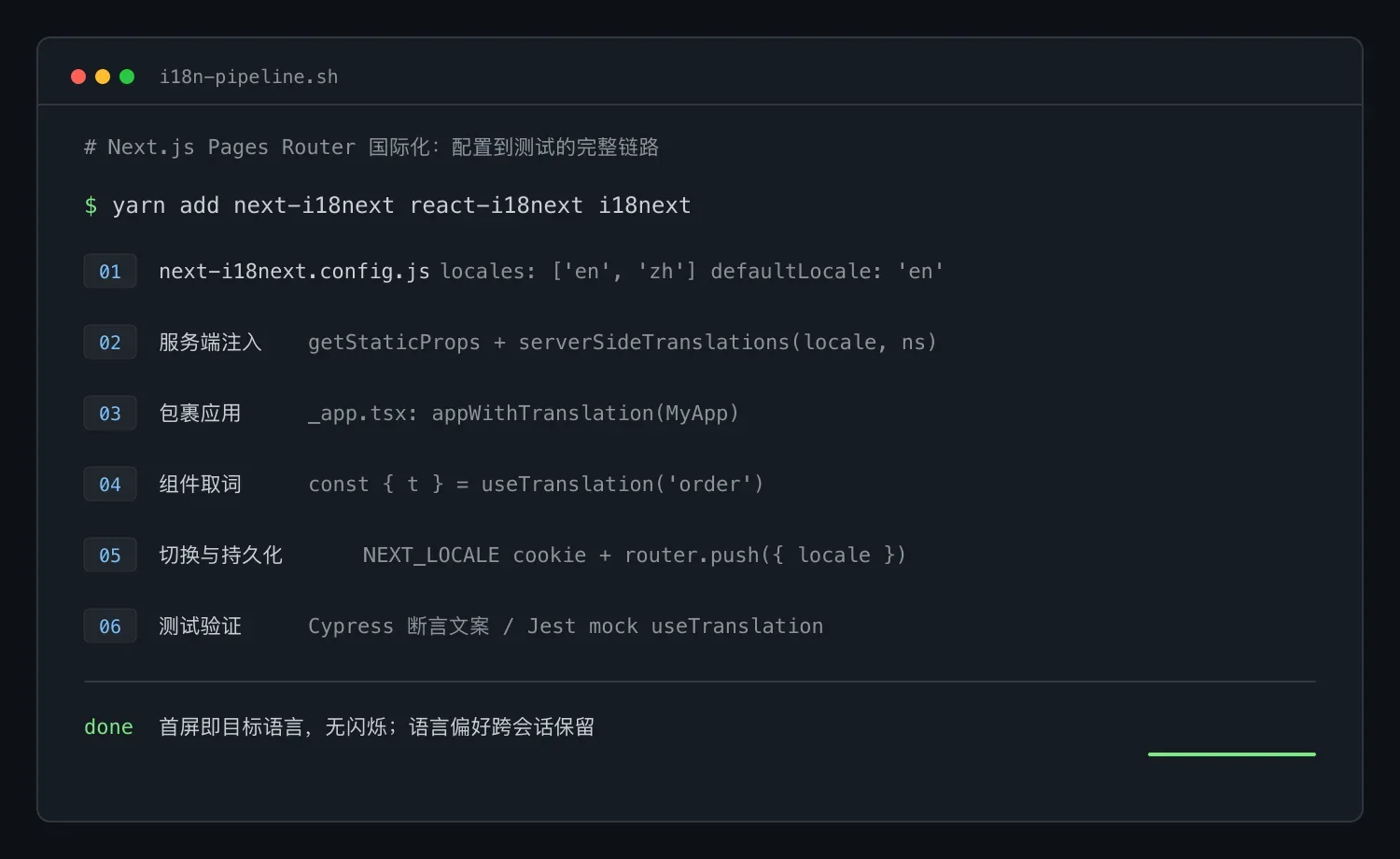
注意 serverSideTranslations 只应传入当前页面真正需要的命名空间数组;翻译内容在服务端注入 props,页面首屏渲染即为正确语言,不会出现先渲染默认语言再切换的闪烁。
七、测试配置
E2E 测试直接从真实翻译文件里取期望文案,避免测试代码里硬编码两份字符串:
import orderLocale from '../../public/locales/en/order.json';

describe('Test My Order', () => {
  it('Should visit my order', () => {
    cy.visit('/order');
    cy.contains(orderLocale.Tab.order.title).should('be.visible');
  });
});
单测里则通过 jest.mock 替换 useTranslation。先创建 createI18nMock.ts,初始化一个真实加载 JSON 的 i18next 实例:
import i18next from 'i18next';
import { initReactI18next } from 'react-i18next';
import common from '../../public/locales/en/common.json';

i18next.use(initReactI18next).init({
  lng: 'en',
  fallbackLng: 'en',
  ns: ['common'],
  defaultNS: 'common',
  resources: {
    en: {
      common,
    },
  },
});

export default i18next;
再在 jest.setup.ts 中完成替换:
import i18next from './src/test-utils/createI18nMock';

jest.mock('next-i18next', () => {
  return {
    useTranslation: () => {
      return {
        t: (key, option) =>
          i18next.getResource('en', option?.ns || 'common', key),
        i18n: {
          changeLanguage: () => new Promise(() => {}),
        },
      };
    },
  };
});
这样组件测试既隔离了国际化运行时与路由依赖,断言值又来自真实翻译文件,翻译一改测试同步感知。
八、常见问题与处理
- Can't resolve 'fs':i18next 在客户端打包时尝试解析 node 的 fs 模块导致。在 next.config.js 的 webpack 配置里把客户端 fallback 的 fs 置为 false 即可,见第二节。
- 刷新后语言被重置:通常是切换语言时没有写入 NEXT_LOCALE cookie,或 cookie 没有设置
path=/与足够长的 max-age,导致刷新后回落到默认语言。 - 构建出现大量临界依赖警告:i18next 动态加载语言包触发 webpack 提示,把 exprContextCritical 关闭即可。
总结
这套方案的完整链路是:选型 next-i18next 并区分 App Router 与 Pages Router 的适用边界;配置 locales 与 webpack 规则;在 public/locales 按语言和命名空间组织 JSON 文案;服务端用 serverSideTranslations 注入翻译,客户端用 useTranslation 取词;切换语言时写 NEXT_LOCALE cookie 并保持路由参数不变;最后用 Cypress 覆盖 E2E、用 Jest mock 覆盖组件单测。整套配置经过真实项目验证,可以直接作为 Next.js Pages Router 项目的国际化底座。